Lab 5: Sequence alignment (without pointers)
This weeks lab is a practical test of algorithms based on “dynamic programming”, applied to one of the fundamental problems in bioinformatics.
Determining Similarity
One of the central problems pursued in bioinformatics is determining similarity between sequences of nucleotides or amino acids (the basic information that makes up our genetic structure). Similarity information is required to perform some typical tasks including:
- Using a given sequence of amino acids to infer a protein’s shape and function, and
- Finding all the genes and proteins in a given genome.
Usually, when given a particular sequence, you would search through one of the publicly availiable databases (visit, for example, the NCBI database for more information) and find multiple sequences that have varying degrees of similarity to the sequence in question. It is then up to the researcher to select the ones of most interest. In this lab we will focus on the underlying problem of determining similarity between two nucleotide sequences.
Exercise 5.1
For this assignment you will write a program in Snap! which finds the optimal global alignment between two sequences of nucleotides.
Snap link: A project file with the framework for the assignment is available here.
The Global Alignment (Needleman-Wunsch) Algorithm
As described in the lectures, the global alignment algorithm is a dynamic programming algorithm. Given two sequences, at any point in the alignment we have three choices:
- Align the two nucleotides
- Introduce a gap in the first sequence
- Introduce a gap in the second sequence
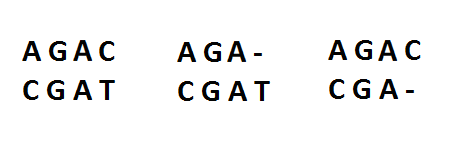
So as we align our sequence, at each point the optimal alignment is given by the optimal alignment up to that point, plus whichever of the above choices gives us the greatest alignment score.
To achieve this we will construct a score matrix $F$ with the number
of rows equal to the length of the first sequence plus one and the number
of columns equal to the length of the second sequence plus one. Each
element in this matrix represents the score of the optimal alignment
up to that point in each sequence. To fill in the matrix we start at
the top left element (inititalised to 0) and move left-right,
top-bottom. At each element $F(i,j)$, the elements above ($F(i-1,j)$),
to the top-left ($F(i-1,j-1)$) and to the left ($F(i,j-1)$) represent
the decision to introduce a gap in the second sequence, align the two
nucleotides, or introduce a gap in the first sequence respectively. So
to fill in in the element $F(i,j)$ we use the formula

where $d$ is the penalty for introducing a gap and $s(x,y)$ is the
score for aligning the two nucleotides.
In this lab, we only consider exact matches (identical nucleotides) as a “good alignment” (with a positive score); anything is a misalignment (with a negative score).
The calculation of each element is illustrated in the following figure

After the score matrix is completed, the optimal alignment is found by
starting at the bottom right element in the matrix, and tracing back
the steps taken to get there. This is done by comparing the value of
$F(i,j)$ with that of the three neighbouring cells it could have
been obtained from:
- If
$F(i,j) = F(i-1,j) - d$, the value came from the cell above. Add the nucleotide for sequence 1 and a gap for sequence 2. - If
$F(i,j) = F(i,j-1) - d$, the value came from the cell to the left. Add a gap for sequence 1 and the nucleotide for sequence 2. - Otherwise, the value must have been obtained from the cell diagonally above-left: Add the nucleotide from both sequence 1 and sequence 2.
For example, given the following score matrix,
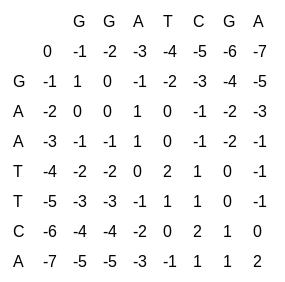
the corresponding optimal alignment is

The gap penalty in the example score matrix above is $1$. Try to
reconstruct the aligned sequences above by following the rules.
Step 1: Compute the score matrix.
The lab project provides a block which creates the score matrix and handles the visualisation. To initialise a new matrix, select (or type in) two sequences you wish to align and run the following blocks

You should see the outline of the score matrix appear on the stage.
Your task is to implement the global alignment algorithm, described
above. Place your solution in the
 block.
A basic stub of the block is provided to illustrate how to use the
helper functions.
block.
A basic stub of the block is provided to illustrate how to use the
helper functions.
The three inputs to the solution block are the values to use for
$s(x,y)$ and $d$ in the algorithm:
- The first input (good alignment score) is the score for aligning
two equal nucleotides, i.e.,
$s(x,y)$when$x = y$. - The second input (misalignment penalty) is the penalty for aligning
two unequal nucleotides, i.e.,
$-s(x,y)$when$x \neq y$. - The third input (gap penalty) is the penalty for introducing a gap
in either sequence, i.e.,
$-d$.
When you have completed and run your code, you will be able to see the computed score matrix on the stage. Before you can see the corresponding optimal alignment, however, you must also implement step 2, the traceback procedure.
Hints
- You can use the
 block
to set an element of the score matrix to a particular value. It will
also update the matrix shown on the stage.
block
to set an element of the score matrix to a particular value. It will
also update the matrix shown on the stage. - You can use local variables, or define additional reporter blocks that help you with the task. (For example, a “max” block may be useful.)
Step 2: Find the optimal alignment.
You must also implement the procedure for extracting the optimal alignment from the finished score matrix:

Remember that this block needs the same gap penalty as input that was used to compute the score matrix, otherwise you cannot decide how a value was obtained.
The alignment is returned as list of lists, each of which has two elements. Here is an example of the list that represents an alignment of four elements, drawn next to it:
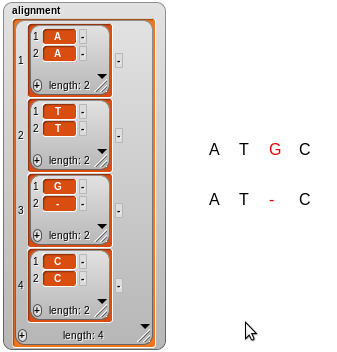
The  block draws
an alignment on the stage. You can try it out with some different
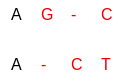
lists to see how the representation works. For example,
block draws
an alignment on the stage. You can try it out with some different
lists to see how the representation works. For example,
 will draw the following:
Testing
The lab project comes with some sample sequences to test your block on, four of length 7 and two shorter of length 5. The example score matrix above is for aligning two of them, GAATTCA and GGATCGA, with default scores. The optimal alignment has one mismatch (in the second position) and one gap in each sequence.
Try comparing all sequences of the same length pair-wise.
You should also try varying the scores. If you keep the gap penalty at 1 and increase the misalignment penalty to any value greater than 2, you should get alignments that have no mismatches (because a mismatch can always be avoided by introducing two gaps). Verify that your implementation does this! On the other hand, if you increase the gap penalty while keeping the misalignment penalty at 1 you should see fewer and fewer gaps.
Exercise 5.2
The block you have implemented so far computes the best alignment between two complete sequences. Sometimes, however, the objective is to find similar subsequences in two given sequences. Fortunately, only a few small modifications are needed to compute an optimal local alignment. (This is known as the Smith-Waterman algoritm.)
For local alignment, the maximum score function is given by

In other words, an alignment between two subsequences with a negative score is never optimal, because in that case a better alignment can be made between shorter subsequences.
When the score matrix is completed and we wish to find an optimal local alignment, we need to start tracing back from the largest score in the matrix (instead of the bottom right corner) and trace back until we reach a score of 0 which is where we stop.
Your task is to implement the local alignment algorithm, in the block
called
 .
(Remember that you can use the “duplicate” function to copy your earlier
implementation so that you don’t have to rebuild it from scratch.)
You will also need to implement the block called
.
(Remember that you can use the “duplicate” function to copy your earlier
implementation so that you don’t have to rebuild it from scratch.)
You will also need to implement the block called
 to extract
the optimal local alignment. It should be in the same form as before
(a list of lists of two elements) and can be shown with same block.
A block that finds a maximum value in the score matrix and returns the
optimal local alignment from that point is provided, but it uses the
block you must implement.
to extract
the optimal local alignment. It should be in the same form as before
(a list of lists of two elements) and can be shown with same block.
A block that finds a maximum value in the score matrix and returns the
optimal local alignment from that point is provided, but it uses the
block you must implement.
Testing
You can use the same test cases as for the global alignment. However, local alignment is more sensitive to the score given to a good aligment (match): The higher it is, relative the the misalignment and gap penalties, the more willing we are to accept a worse alignment of longer subsequences. As an example, aligning the sequences GCATGCT and GGATCGA with good alignment scores of 2 and 1, keeping both penalties at 1, gives subsequences of different lengths.
Assignment submission
To submit your assignment, you must export blocks (as described on the lab 1 page. You should export the blocks that you defined in this lab (“Solution”, “Solution for Local Alignment” and “Show optimal local alignment”), along with any other custom you created that are used by those.
Submit the file with the saved blocks through wattle.
Test before you submit! Always, test your submission file – to make sure everything that should be included is indeed included!
To do so:
- Start a fresh chrome/chronium session/
- Load the Lab 5 Snap project.
- Use the “import … ” function from Snap to load your submission file, containing your exported blocks.
Now run these blocks – does you solution still work?
Quick links
- Tue 2-3 CSIT N101
- Wed 2-3 CSIT N101
- Thu 12-1 ENG T
Note: The Thu 12-1 lecture slot is used in _some weeks_.