Lab 6: The Sentiment of a Superstorm
For this tutorial, we’ll explore how we can use social data (tweets from Twitter) to enrich our understanding of one of the most destructive hurricanes in US history: “Superstorm Sandy”.
The first part of this lab sheet contains reading material for both sentiment analysis and hashing, the second part contains the excercise questions. Skip directly to the practical part of you are impatient.
Also note that there are five scoring parts in total, Exercise 6.1 - 6.4, and visualization.
Table of Contents
Part I - Preliminaries
- Making Sense of Social Media
- Concept 1: Sentiment Analysis
- A Simplified Approach to Determining Sentiment
- Sentiment Lexicon
- Steps for Determining Tweet Sentiment
- Interlude: The Dictionary Problem
- Concept 2: Hash Tables (not #HashTags)
- Hash Functions
- Buckets and Hash Collisions
Part II - Programming tasks
Practical: Sentiment Analysis of Superstorm Sandy
- Implementing a Hash Function
- Exercise 6.1: Implement a hashing scheme (3 points)
- Implementing a Hash Set
- Exercise 6.2: Implement the insert operation (3 points)
- Exercise 6.3: Implement the contains operation (2 points)
- Testing
- Exercise 6.4: Computing the sentiment score of a Tweet (1 point)
- Sentiment Analysis and Visualisation of Superstorm Sandy Tweets (1 point)
- Extension Tasks
- Extension Task 1: Implement the remove operation
- Extension Task 2: Implement dynamic resizing (rehashing)
- Extension Task 3: Implement the dictionary data structure (hash table)
- Implementing a Hash Function
References
Making Sense of Social Media
The prevalence of social media is changing not only the way society communicates and interacts, but also how we think about social data. For instance, can real-time social data be used to better detect the occurence of an earthquake?[1] Can social media aid diaster response to wildfires?[2] What other kinds of activities could be enriched by the analysis of social data?
The abundance of data presents us with the unique opportunity to better understand and utilise social behaviour and phenomena. This has lead to the rise of Computational Social Science; an interdisciplinary field which explores how computational techniques from computer science can be applied to various fields of social science.
To do this we’ll first review two concepts: sentiment analysis and hash tables.
Concept 1: Sentiment Analysis
There are many ways we could make sense of textual data from tweets. One way is to consider whether the emotional state or attitude it expresses is either positive, negative or neutral. This is called sentiment polarity.
For example this tweet would be considered positive in sentiment:
So happy exams are over. Finally done with second year! Now can look forward to my holiday :D #summmerrr
Conversely this tweet would express negative sentiment:
I hope i do good on my finals tommorow #worried
But what about this one? Is the person actually happy? Can we be sure?
i totally failed math finals so that's good
Try determining whether the following tweets about Superstorm Sandy are positive, neutral or negative:
So happy to wake up to #sandy gone!

Everyone Panic!!!1 RT @NBCNews Full moon could make #Sandy's impact worse http://t.co/hHs5l8EY

#sandy i love you. even if your last names not cheeks*

RT @NewYorkPost: Rainbow touches down in lower Manhattan #hurricane #sandy http://t.co/M6MGqGN7 via @kurtdietrich*

RT @NickpcWx: #Hurricane #Sandy cloud cover is covering nearly 1 million square miles of water/land. @reedtimmerTVN http://t.co/STGZxi2X

RT @GovChristie: I don't give a damn about Election Day after what has happened here. I am worried about the people of New Jersey. #Sandy*
Discussion Questions:
- How did you determine their sentiment polarity?
- Could you write out a list of steps used to determine this?
- Would others following your steps produce the same results?
- What makes determining sentiment difficult?
A Simplified Approach to Determining Sentiment
A simple way to determine sentiment polarity for a tweet would be to determine how many words in the tweet are positive, negative or neutral in sentiment polarity. If there are more positive words than negative words, then the tweet is considered positive. Conversely if we have more negative words than positive words, then the tweet is negative. Otherwise if they are equal, then the tweet is neutral. But how do we determine the sentiment polarity of a word?
Sentiment Lexicon
Determining the sentiment of a word can be accomplished by using a sentiment lexicon. This is a collection of words (or phrases) along with their associated sentiment polarity. For instance a lexicon of positive words could contain the words “happy” and “good” whilst a negative word lexicon could contain the words “sad” and “dead”. Thus the sentiment of word can be determined by checking if it is in either lexicon.
Such a sentiment lexicon can be described as an example of labeled data. This is because the words have been assigned a “correct” label (sentiment polarity). This is accomplished either by experts manually assigning a “correct” value or by using machine learning techniques to determine this.
Discussion Questions:
- What are some of the limitations of this approach?
- Is the labelled data “correct” across different social domains?
- Compare how are the words “bull” and “bear” are used general and in the context of financial markets
- Has social media made it easier to create or access labeled data?
Steps for Determining Tweet Sentiment
Since we are interested in whether a tweet contains more (or less) positive words than negative words, we can assign positive words a value of 1 and negative words a value of 0. Thus if we sum these values for all words in a tweet, we get a score that tell us whether a tweet is positive, negative or neutral in sentiment. We can describe these steps informally as follows:
input is tweetText
set sentimentScore to 0
for each word in tweetText
    if positiveWordLexicon contains word then
        add 1 to sentimentScore
    end
    if negativeWordLexicon contains word then
        subtract 1 from sentimentScore
    end
end
output is sentimentScore
Thus a sentimentScore greater than zero indicates that the tweet is positive. If it is below zero, then the tweet is negative. Otherwise if the score is zero then it has a neutral in sentiment polarity. Note that we ignore neutral words since they won’t change the score.
This description of steps used to determine sentimentScore from tweetText is an example of what is called an algorithm. By expressing the algorithm informally, it keeps our description focussed on how the algorithm works without making us unnecessarily concerned with what Snap! blocks we’ll use.
This informal description is called pseudo-code as it is a not real code nor written in a actual computer programming language. However to be useful it should tie back to a language that you do use or are familiar with.
Discussion Questions:
- Can you tie back all the pseudo-code to the Snap! blocks you have seen/used?
- How would you determine the words of a tweet?
- Look back at the example tweets, what would you need to exclude or consider?
- What concerns would you have if the sentiment lexicon contained a very large number of words?
- Suppose that you have a physical copy of all 20 volumes of the Oxford English Dictionary (2nd Edition), which comprises of over 400,000 entries and 22,000 pages.[4] How would you quickly look up a definition for a particular word?
Interlude: The Dictionary Problem
Looking up a word in a dictionary often relies on the fact that the words are sorted alphabetically. This allows us to open the dictionary to the page where we estimate our word to be; then depending on what we find, repeatedly opening a page on either the left or the right in order to bring us closer to where our desired word is located until we find it (or determine that it is not present). Most would agree that this kind of searching is fast, but is there a faster way?
Assume that you can turn to any specific page in a dictionary in a single step. If you knew the page where your word is located at, you could turn to that page immediately! But how could you already know which page your word is located on before looking it up?
One approach would be to define some kind of function that takes a word as input and outputs the relevant page to look up. However for this to work entries we would also need to place entries on pages according to this function as well, not by alphabetical order. This is the rough idea of how a hash table works.
Discussion Questions:
- How would you look up a word in a dictionary where the entries are placed in a random order?
- What is the most number of pages would have to look through?
- What is the least number of pages?
- What would be the average number of pages?
Concept 2: Hash Tables (not #HashTags)
Similar to how dictionaries store a definition associated with a word, a hash table stores a value associated with a key. However unlike dictionaries which store entries in alphabetical order, hash tables store entries according to a hash function for faster look up. So what is a hash function?
Hash Functions
A hash function is simply a function that takes an input value of arbitrary size and outputs a value of fixed sized. For example consider the following hash function which takes an integer k as input:
$$k \in \mathbb{Z}: h(k) = k \mod 3$$
$$h(1) = 1$$
$$h(2) = 2$$
$$h(3) = 0$$
$$h(23412517) = 1$$
No matter how large the input integer is, the function will always return a value between 0 and 2 inclusively. This is called a hash value and it is useful because just as a phyiscal dictionary has a finite number of pages to put entries in; computers have a finite amount of memory that can be used to store data. Where we store our entries in memory is called a bucket.
Thus if we have n buckets to store our entries in, our hash function should output a value corresponding to a bucket:
$$k,n \in \mathbb{Z}: h(k) = k \mod n$$
Since we want to associate a key with a value, we hash the key to determine the bucket. We then store the key along with the value in the bucket. This is just like storing a word along with its definition on a page in a dictionary.
Discussion Questions:
- Why would it be undesirable for a hash function to give a different output value each time it is applied to the same given input?
- What would happen if we have 100 words to store but only 99 buckets to put them in?
- What would happen if we have two different input values that have the same hash value? How would we store them?
Buckets and Hash Collisions
A hash collision is when two different input values have the same hash value. Collisions are problematic because we need to somehow store and look up multiple values in the same bucket. One way to handle this is to use an addressing method called separate chaining.
The idea of separate chaining is to treat buckets as a list of entries, where one entry is linked to another in a chain. Thus if we want to look up an entry in a bucket, we would need to go through the chain until we find it or reach the end of the chain. If we want to insert an entry we would need to go through the chain to check if it is already there and if so, we update its value. Otherwise we add the entry to the end of the chain.
To illustrate this, imagine that we’re given the task of reorganising the 400,000 entries of the Oxford English Dictionary (OED) across 20 volumes which are numbered and currently empty. Assume that each word-definition entry takes up a single page (this is reasonable since the OED is very detailed). For each word-definition entry, we would determine a hash value for the word that gives a value from 1 to 20. Based on this value we place that entry’s page into the correspondingly numbered volume. If that volume is currently empty we simply insert the page, otherwise we insert the page at the end. If later we need to update the definition for a word, we use our hash function to determine the volume to check, then flip through its pages to replace the existing entry.
Discussion Questions:
- Are hash collissions avoidable? What would be needed to avoid any collissions?
- Would it be better to have more or less buckets? What would happen if we only have one bucket?
- Why would it be undesirable for our hash function to put more entries into one particular bucket over others?
Practical: Sentiment Analysis of Superstorm Sandy
Files Needed:
- The Snap! workspace with the Hashset project file is here
- The Snap! workspace Sandy Tweet Visualiser project file is here
To demonstrate both of these concepts, we’ll use Snap! to analyse the sentiment of tweets about Superstorm Sandy from the United State of America and visualise their polarity on a map.
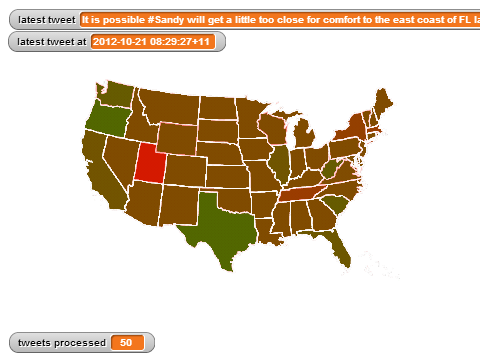
To do this we’ll need to use a sentiment lexicon of positive and negative words and store them in a hash table for fast look up.
But since our sentiment analysis does not take into account different degrees of positive or negative polarity (i.e. +0.5 or -0.6), it isn’t necessary to store both a word and its sentiment polarity value. Instead if we store all positive words in one hash table, and all negative words in another, then we only need to store the word itself since we will know the polarity (positive or negative) of all words we look up in that particular hash table. This is the idea of a Set, which is simply a collection of distinct elements.
Here’s an example of a set of positive words and negative words:
Note that there can be no duplicate elements in a set and that the size (also called the cardinality) of the two example sets is 3.
Since we are using hash tables to implement a set, we call this a hash set.
Implementing a Hash Function
As you’ve read, a hash set (or hash table) depends on a hash function for all its operations. However hash collisions are bound to happen and handling these collisions adversely affects the performance of our operations. Consider the example where our hash set uses a hash function that puts all words into the same bucket. To look up or remove a word we would need to possibly go through all the words we have inserted because the bucket contains a chain that is as long as the number of words we have inserted. This is akin to looking up a word in a physical dictionary where the words are placed in a random order!
On the other extreme end, if we have at least as many buckets as we have words, then a hash function that allocates a word to its own bucket would perform extremely fast since the chain is as small as possible since there are no collisions!. Such a hash function is called a perfect hash function.
However for most practical purposes, hash collisions are unavoidable. Instead the goal is to create a hashing function that is as uniform as possbile. This means that our hash function should roughly distribute the same number of words into each bucket. Thus if we have m words and n buckets, we would expect each bucket to contain m/n buckets.
Since the input of our hash function is a word, we need to devise a method (or algorithm) of turning that word into some number. Ideally this number should be determined by using all the characters in a word. We call this a hashing scheme and it is simply a function that takes a word as input and outputs a number.
Once we define a suitable hashing scheme our hash set will use it to define its hash function as shown below:

Notice that  uses another function
  to transform the element (in our case a word) into a number so it can perform modulo on it using
  in order to allocate it a bucket. The addition of 1 is because modulo can return 0 but Snap! indexing begins at 1.
Thus the ability of a hash function to distribute elements uniformly across the buckets depends on devising a good hashing scheme.
Exercise 6.1: Implement a hashing scheme (3 points)
To illustrate a bad hashing scheme, we’ve implemented a very simple one  that simply uses the first letter of a word. This is bad because it means that all words starting with the same letter would go to the same bucket resulting in a lot of collisions. The goal for this task is to try to come up with a better hashing scheme that results in a hash function that is uniform.
Programming Instructions:
Complete this task by editing  and completing the definition:
 .
.
Your code is expected to:
- Use the
 block to map a letter of a word into a number so we can perform calculations on it. This table outlines the mapping between any character to numbers – it contains not only English (or called ascii) characters, but also alphabets from any written language in the world.
 - Use all the letters of a word would help to avoid collisions.
Use both the letter and their position in the word will help distinguish words that are anargram of each other, e.g. dog or god.
Use an appropriate hashing scheme so that your hash set on a modest list of English words is as uniform as possible (i.e. passes the uniformity test block below.)
Hint: Prime numbers are useful for preventing collisions. See the 3rd answer answer on this page reports an observation of a collision test on 50,000 English words.
Test this block: After finishing your implementation, type a few different words in the input slot. Do you get a (large) integer from each that are different?
Implementing a Hash Set
A hash set is a specialised version of a hash table. A hash table stores both a key and a value using a hash function. In our dictionary analogy, a word is the key and its associated definition is the value. However for hash sets we only store the key. Thus if we don’t need to store a value associated with a key, it is more efficient to use a hash set. Whilst both use hash functions to also look up a key, the difference is that a hash table returns the value associated with a key, where as a hash set simply tells you if it contains or doesn’t contain the key.
A hash set and a hash table are both examples of what is called a data structure. A data structure is simply a particular way of storing and organising data so that we can perform certain operations on it in a efficient manner. In this case, hash functions are used to store and organise the data for fast look up.
For the purposes of this practical we only need to implement two operations: one that insert words into the hash set and another that checks if the hash set contains a particular word.
Exercise 6.2: Implement the insert operation (3 points)
The insert operation allows you add additional elements to the set. For our use case, this will be to add additional words into the set.
To insert an element into the set using separate chaining, we’ll need to first create a hash value in order to determine the bucket we will insert it into. Then we’ll need to check if the bucket is empty; if so we can simply add the element, otherwise we’ll need to add it alongside the other elements already in the bucket. But since sets do not contain duplicates, we should only add the element if the bucket doesn’t already contain that element.
Programming Instructions:
Make
 to take the hash code generation routine you used.
Completing the definition for
 by filling in the stub with working code:

Hints:
- Inside the
there is a special constant value called
 . Use this to check if a bucket is empty.
 - Buckets need to be able to hold multiple elements (due to hash collisions). What Snap! block can we use to hold multiple elements?
A set cannot contain duplicates of an element. Check that an element is not already in the set before you actually insert it.
Inside the
there is a variable called  that keeps track of the number of elements entered into the set. Be sure to increment this by one every time you insert an element.
Testing this function:
This group of blocks are written to allow you to see the contents of hash bucket you created. Use them to test your insert functions and see the contents of the hashset.

Exercise 6.3: Implement the contains operation (2 points)
The contains operation is used to check if a element is a member of a set. For our use case, this will be to check if a word from a tweet is part of the positive word lexicon, or if it is part of the negative word lexicon.
To do this, again we’ll need to determine which bucket to check by using the hash function to get a hash value for the word we wish to check for. Once we get the bucket we then need to check if it is among the other elements chained. If we find it, we  , otherwise we
  .
.
Snap Instructions:
Complete this task by editing
and completing the definition for  by filling in the stub with working code:

Hints:
If the bucket is empty then it clearly cannot contain the element. How can we check this?
This lab included a utility block in the ‘variables’ group, called foreach

Testing this function: Use this block  to test whether or not your ‘contains’ function is working correctly.
Testing
To help you implement your hash set, we’ve provided several blocks that you can use to test your implementation very easily. In Software Engineering, such a test is called a test harness and they are important for making sure your blocks (code) works correctly.
To use them to test your blocks, simply provide the test harness with a hash set that has a provided hash scheme as shown below:



The hash scheme can be
,
or any other suitable block. Make sure that it is put in the correct place.
Run the test by clicking on the block or executing it as you would any other Snap blocks. It will then then tell you whether it passed or why it failed.
Your implementation should pass all three tests.
Discussion Questions:
- Does testing ensure that your code is completely correct?
Exercise 6.4: Computing the sentiment score of a Tweet (1 point)
With the hashset implemented, you are ready to compute the sentiment score of a tweet!
First use your own hash set and hashing scheme implementation to construct the positive and negative word lists, by executing the following blocks.
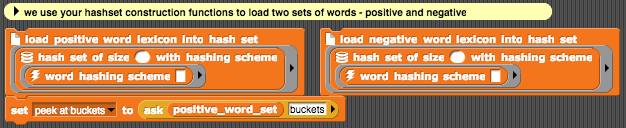
You then modify the block that computes sentiment score  to loop over words in the tweet and compute its sentiment score. A screenshot of the function stub for you to fill in the code is shown below.
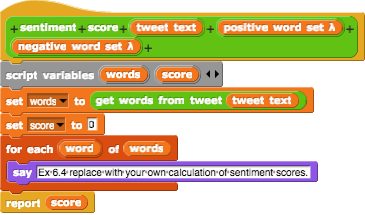
Use the few examples in the workspace to test out how well your scoring function works.
Submitting Excercise 6.1-6.4: This assignment has two parts and you must submit them separately. You should export the blocks that you defined in this lab:
- “word hashing scheme” and
- “hashset of size () with hashing scheme __”
- “sentiment score (tweet text, positive word set, negative word set)”
along with any other custom blocks you created that are used by those.
Test before you submit! Always, test your submission file – to make sure everything that should be included is indeed included!
- The first test for this assignment is included in the test harness above.
- The second test you can run, is via the Superstorm Sandy visualizer below.
Sentiment Analysis and Visualisation of Superstorm Sandy Tweets (1 point)
Once you’ve finish implementing your hash set and sentiment score you can now use it to analyse the sentiment of tweets about Superstorm Sandy[3] over time and visualise them on a map of the continental United State of America (excluding Alaska and Hawaii).
Snap Instructions:
<!–1. Firstly export your completed
and
blocks along with all other needed blocks to a file (to be safe, export everything).
–>
This part assumes that you have a saved copy of of the blocks from Excercise 6.1-6.4.
- Open a new version of Snap and import the Sandy Tweet visualiser project file (available here)
- Import your blocks into the project.
- If you’ve imported the visualiser for the first time you need to reset the visualiser:

- Similar to testing, simply drag your implemented hash set along with its hashing scheme into the load lexicon blocks and run them:
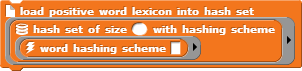

6. Run the visualiser from your desired starting tweet, where 1 denote the first tweet in the dataset and the 582269 is the last.

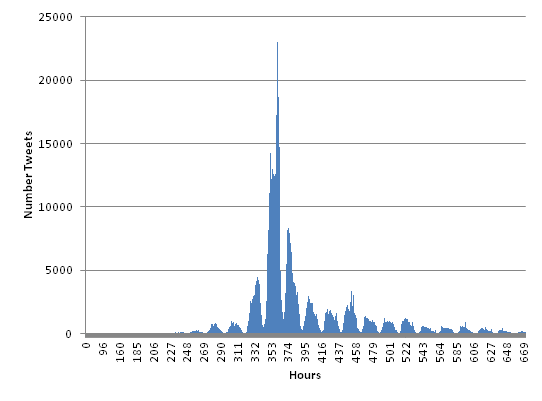
Whilst these tweets cover the dates from 15 Oct 2012 to 12 Nov 2012, the bulk of the tweets come from a very specific time period:
Frquency of Tweets over Time (Hours)
Discussion Questions:
- What do you think is the significance of the peaks?
- The peak number of the tweets occurs between tweets numbered 115000 and 275000. Try visualising and comparing their sentiment.
Enjoy!
Submitting a screenshot of the visualization:
You let the visualizer run for while, and submit a snap of the Snap! stage when you are satisfied with the result. Capturing part of the screen can be done via keyborad shortcut on a mac, or using the Snipping tool on Windows, or the Take Screenshot tool in Ubuntu.
Here is mine, what does yours look like?
Extension Tasks
For those that have completed all the previous tasks, here’s an opportunity to further your understanding, improve your programming skills as well as to earn bonus marks! These tasks have less guidance and support than the previous ones so you are expected to do your own reading or research if needed. You only need to implement one of the following:
Extension Task 1: Implement the remove operation
The remove operation is used to take out elements from the set. We don’t need to use this for our sentiment analysis since we can safely assume that all the words we load into our hash sets are correct. However without a remove operation our implementation of a hash set is incomplete.
Snap Instructions:
Complete this task by editing
and completing the definition for  by filling in the stub with working code:

Hints:
- The
removeoperation is the opposite of theinsertoperation. Determine what steps you need to take to remove an element with this in mind. Writing pseudo-code might help. - You can’t remove an element that is not already part of the set.
- Use the provided test harness to check that it works:

Extension Task 2: Implement dynamic resizing (rehashing)
The more buckets we have, the less likely we’ll have collisions. Ideally if we know or if we can estimate how many elements (or words) we need to load into a hash set, then we can set the number of buckets (size) to sbe at least as large to reduce the number collisions. However if allocate too few buckets then we will have a lot of additional collisions that could have been avoided.
Our hash set would be more robust if it could resize itself depending on the load. One way this could be be accomplished is by rehashing all the elements into a large number of buckets when we the number of elements in the hash set exceeds a certain threshold. We call this threshold the load factor.
Take a look inside the
and you will notice that before any elements are inserted, there is a condition being checked to determine if the hash set is exceeding the load factor:
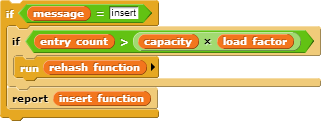
Unfortunately the  is not currently doing anything useful.
Your task is to edit
which is inside the
and add code blocks for this function so that it rehashses all the elements into a new larger number of buckets.
Hints:
- What variables do you need to reset?
- This block snippet might be helpful to keep your code tidy:

Extension Task 3: Implement the dictionary data structure (hash table)
As our approach to sentiment analysis is very simple (words are either positive or negative), we didn’t need to the full capabilities of a hash table to create our lexicon. But if the words in our lexicon were associated with a polarity value between -1 and +1, using hash sets would be infeasible since we would need a hash set for word with a polarity of -1, -0.9 -0.85… all the way to +1.
In this case we should actually use a hash table (dictionary) to implement our lexicon. Since hash tables store a key and an associated value, we can use it to store a word (key) along with its sentiment polarity (value). We can then look up the sentiment polarity for all words very quickly from a single data structure.
In Computer Science, this idea of storing a key associated with a value is called a dictionary data structure and it is useful for a wide variety of applications. One important area of application is indexing which is used to quickly retrieve information from a query. For example web pages from a search or visualising the usage of certain words or phrases over time using Google Ngram Viewer.
And besides, after all those dictionary analogies, wouldn’t it be a shame if we didn’t implement a dictioanry data structure?
Hints:
- Implement the hash table by creating a new block and duplicating the definition inside of
as a starting point.
- Keep the concept of a key separate from the value; we only hash the key but we need to store both the key and the value together in a bucket.
- An example of how you could store the key and the value:
 .
.
References:
Map Images of United States of America:
Showeet: Hi-Def Editable PowerPoint Map of USA - Free Map (2010), http://www.showeet.com/24⁄03/2010/maps/hi-def-editable-powerpoint-map-of-usa-free-map/ (accessed April 2014).
Used under the Creative Commons Attribution-NonCommercial-ShareAlike 3.0 Unported License.Sentiment Lexicon:
Liu, B.: A list of positive and negative opinion words or sentiment words for English (2004), http://www.cs.uic.edu/~liub/FBS/opinion-lexicon-English.rar (accessed April 2014).Takeshi Sakaki, Makoto Okazaki, and Yutaka Matsuo. 2010. Earthquake shakes Twitter users: real-time event detection by social sensors. In Proceedings of the 19th international conference on World wide web (WWW ‘10). (abstract)
Bertrand De Longueville, Robin S. Smith, and Gianluca Luraschi. 2009. “OMG, from here, I can see the flames!”: a use case of mining location based social networks to acquire spatio-temporal data on forest fires. In Proceedings of the 2009 International Workshop on Location Based Social Networks (LBSN ‘09). (abstract)
Quick links
- Tue 2-3 CSIT N101
- Wed 2-3 CSIT N101
- Thu 12-1 ENG T
Note: The Thu 12-1 lecture slot is used in _some weeks_.