Lab 3: Make Your Computer Sing (tunes) and Talk (nonsense)
This week, Snap will sing and talk! – all using the notion of lists and arrays learned this week.
Note:
- See here for due dates and submission instructions.
- The Snap! project for lab 3 can be accessed here.
Exercise 3.1 Snap can talk … nonsense (10%)
You’re now sufficiently warmed up by the singing excercises above on reading and interpreting lists/arrays. Now let’s make Snap! talk (or write), and this is achieved by assembling a list from other lists.
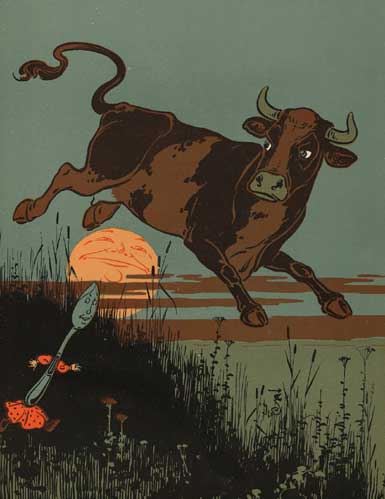
The goal of this task is to get Snap to “say” some literary nonsense that look grammatically correct. One well-known example for this type of literary nonsense is “the cow jumped over the moon” from the English nursery rhyme Hey Diddle Diddle, as illustrated here.
Background: You may ask: why should I care about nonsense like this? Breaking text down into its structrual components, and assembling words are the basic operations of computational linguistics or the computer science sub-field natural language processing. The well-known Turing test, once known as one of the ultimate test of a machine’s intelligence, requires the machine to generate text and carry out conversation with a human. What you are going to do below is a small building block of internet chatterbots, such as A.L.I.C.E..
Now let’s program: This task starts with a simple three-part sentence template “SUBJECT-VERB-LOCATION”. Open the editor for the block called “talking_setup”, you will see three variables SUB, V and LOC, each containing candidates for SUBJECT, VERB, and LOCATION, respectively.

Run these two blocks in workspace  , and you will see the same nonsense – “the cow jumped over the moon” printed five times on the screen. Let’s try to get some new nonsense:
Open the block generate_nonsense, and you will see a program as below. It prints “the cow jumped over the moon” by taking the first element from each of the three input lists (called subject, verb and location).

In particular, notice the join block.
 It does the opposite of the split block introduced above, i.e. assemble a string of text by concatenating a list of words and spaces.
Your task is to make some changes in the join block, so that each time the program will randomly pick one element from each of the candidate lists to assemble a sentence. Notice that the candidate lists have different number of candidate words, make sure your program can deal with this, and when the list of words change.
You will need a new block for this task,
 . Try clicking it to excute (you get a number!), then execute it again (you get a different number!) … What this block does is equivalent to picking a number (from 1 to 10) from a hat – you won’t know which exact one you will get, but the chances for getting any of the possible number is (roughly^) equal.
Change the candidate words by changing the lists inside the block talking_setup, keep generating sentences until you are happy with the result. If you want, you can also change the template to generate more complex nonsense!
Some more background: You may also ask: why is this nonsense? This can be understood with two concepts. Syntax is concerned with the structure of language. Semantics is concerned with the meaning of words and sentences. In “the cow jumped over the moon”, the syntax (grammar) is correct, but its semantics (content or meaning) does not agree with commonsense – leading to the memorable, and sometimes laughable effects of the literary nonsense. More broadly, the notions of syntax and semantics not only applies to natural languages (e.g., English), they also applies to programming languages. These topics are discussed further in later-year computer science classes such as Document analysis or Principles of programming languages.
Music Preparation (0%)
We’d like you to test your computer sound setup, and briefly review a primer on ‘singing’.
Testing your setup
Plug an earphone to your computer, open Snap!.
Find this block
 from the left-hand-side menu, drag it to your workspace, click to execute it.
Did you hear a note? (if not, check your sound settings and computer volume)
Try changing the first and second number in the block to something else. How did the sound change?
Review: Notes
A note is the basic building block of music.
Now lets put a few notes together and hear them. Put together five note blocks as shown below, change the first number to successively increment by one.

Click to execute, and you will hear the first five notes in this picture
 , i.e. the standard chromatic scale starting from C, or the five shaded white and black keys on a piano keyboard
Now let’s do this: Make a program (i.e. a set of note blocks) so that Snap! sings the C Major scale, i.e. notes below, or the white keys within an octave on the piano keyboard.

Review: Rhythms
So far we’ve been changing the first number on the note block – this is the pitch, mapped to numbers in midi notation (so that 60 is C, 69 is A, and so on).
The second number represents the note value, i.e., how long the note should be sung.
Now let’s implement rhythm on an old-and-boring scale with dotted notes, a most-commonly used note modifier. Take the first five notes from your C-major scale above, and change them as follows:

Excute this code and listen. Does this sound a little less boring to you?
Question: What rythm(s) cannot be accurately represented in the Snap! block we use?
Question: What is the score of these five notes with dotted rhythm?
Exercise 3.2 Singing a tune (30%)
How can you teach Snap! to sing any tuned? Let’s use what you learned about lists and arrays to help here.
First open this link to see the project for lab3. You’re provided an first list in a variable called “score_amazing_grace” –containing the opening phase for Amazing Grace. Click on the organge “set” block to initialize this variable.
Open the function called “sing_a_tune” by right-clicking the grey function block, and selecting the last menu item “edit” as shown below.

A skeleton of this function is already provided, it will look like the one below:

Here you are provided with a variable index to loop through the score, and the variable note stores information about each note as implemented there. Note that the “split block”  takes a string as input, and returns a list of substrings that were originally separated by one given character – in the “hello world” case, it’s two words separated by a space; in the score list, we split each element of a note as two numbers (pitch and value) separated by a comma. You just need to replace the purple “think” block with code that makes the correct sound given information in variable note.
When you’re done, click on the block ‘sing_a_tune(score_amazing_grace)’ to hear the result – does this sound right?
Note: You will need to remove the placeholder purple “Think” block and place your code in its place. Otherwise Snap will still sing but it will not sound quite right!
Test your block! Testing (and testing, and testing again) is the key to creating correct software. Don’t be discouraged if it doesn’t sound right (or doesn’t even make a sound) the first time, try to find where things went wrong and fix it. Feel free to ask tutors/lectures to help
Exercise 3.3 Improving your function (20%)
Now let’s work on a differnt tune – the opening phrase of Radetzky March by J Strauss. You can listen to it on YouTube by Vienna Philharmonic orchestra in 2014 New Year concert, or by a piano. This will reveal two aspects of our “sing_a_tune” function that needs improvement.
?? What is the pitch “0” in the score? This is used to denote rest, i.e. a silent note in for a particular duration. Use the rest block  to make this happen.
Making a list
The first is the input: it can be a pain to write a long list every time you’d like to sing a tune!
An easier way is to represent the score in one long string – with notes separated by semi-colons, and within each note the pitch and value are separated by a comma. Can you parse this long string in to a list of notes?
This should be implemented in the
 block that takes the string as input, and output a list in the format as above – and you assign the output to variable _score_radtzskymarch as in the project.
Changing the tempo
Now you use the “sing_a_tune(score_radtzsky_march)” to play this tune using block
 … wait, Why does this march sound like everyone is falling asleep? – It’s too slow!
In music the notion of being fast or slow is captpured in a property called tempo (as explained by bbc and wikipedia). Tempo is measured in BPM, or Beats Per Minute. When you foot-tap along the music, a beat very roughly correspond to a unit of ‘tapping’. 60bpm is one beat every second. We know that the tempo for Amazing Grace is 72bpm, as seen in the sing-a-tune function, whereas the tempo for energetic music, such as marches, is about 140bpm (i.e. a little more than two beats per second).
Now make a new function “sing_a_tune2” to take into account tempo. Hint: you can duplicate-and-drag the existing structure in sing_a_tune and move them to sing_a_tune2, and take it from there!
Once you are done, play this tune using
 – now does it sound right?
Exercise 3.4 Shifting keys (20%)
Now you can sing-along or hum-along your Snap! program with your friends.
But wait … you may have a different vocal range than where the tune is at. In other words, the tune may be ‘too high’ or ‘too low’ for you to sing. For example, someone with baritone or bass voice may have difficulty singing the Radtzsky March in our assignment. One commonly used solution is to shift the pitches of notes, up or down.
In Snap!, shifting keys can be done with the simple arithmetic operations of addition and substraction.
You start by stacking three blocks, initially playing a note sequence E3-G3-C4. The range of these notes starts from a low-E, your bass or baritone friends may not be able to sing this one. (And if you know a bit of how chords work, this is a transposed C major chord ending in central C)

Now you make three other blocks as below, shifting the whole chord lower to G-major ending in the middle G.

Now the note sequence sounds lower overall, but the relationships between adjacent notes sounds the same. The Baritones are happy, but the first note is so low that your soporano friends may not be able to sing this one. Note how you can substract 5 from the pitch value of each note in the first picture to get the second picture. btw, this is called five semitones, i.e. there are four black and white keys, between G and high C, and hence four intervals.
Your task:
- Implement a function called “shift_and_sing” to shift the key of a song up or down for a given amount, in a variable given as “shift”.
- Midi notes should be a positive integer, and “0” is used to denote rest. Within your function, check that all notes are euqal or above zero – otherwise output an error message and halt the program.
Hint: you can re-use the singing function you just made.
Now sing along the Radtzky – is this more comfortable?
Exercise 3.5 The Crab Cannon (20%)
Now we are ready to play some advanced music! We explore the possibilities of singing in Snap! via the famous Crab Canon as seen in the book Gödel, Escher, Bach.
Preparation: concurrency and playing chords
Our computers are often doing more than one thing at any given time – for example, recieving an instant message while showing you a google search result. Making music also often require doing more than one thing at a time, such as, bowing more than one string at a time on a violin, hitting more than one key on a piano, or more than one person playing at any given time in an orchestra! Let’s use the computers’ ability to mutli-task (called concurrency) to play poly-phonic music.
The way Snap! achieves multi-tasking is via sending and receiving messages. Look at the code block below, excute the following steps, observe and hear the behavior.
- Step 1 – click on each of the two groups of tone-playing-blocks. Do you hear “C-E-G” and “A3-C-E”?
- Step 2 – now click on the left-most group with the “broadcast” block. Do you hear chords?
 The “broadcast” block is acting like a commander here, it is responsible for shouting out the “play_chord” message. The two “When I receive” block act like soldiers, they are tuned in to “play_chord” message, and will start acting (i.e. excuting their respective programs) upon hearing it.
Note: Just like naming variables, you should assign sensible names to the messages.
Additional reading: You can find another explanation of concurrency in snap! here, plus another code example of broadcasting and recieving messagings in Snap! via a fun drawing program.
The Crab Canon
The enigmatic Canon 1 à 2 from J. S. Bachs Musical Offering (1747) depicts a single musical sequence that is to be played front to back and back to front.
Here is a musical video that visualizes the manuscript while it’s being played, its reverse, the two voices played together, then the two voices visualized on a mobius strip, and finally the two voices with different instruments.
Your Crab Canon
We use the “https” block to get a copy of the top voice of the crab canon from the course website (you can see it here). And then you can use the ‘sing_a_tune2’ block to play this voice, as shown below.

The way to have the second voice for the crab canon is by implementing the function that reverses the first voice in time.
Put your implementation in this place-holder block  .
.
First test your block by playing out the reversed voice. And then test your music by playing the two voices at the same time.
For fun: Sing your own tune
Pick some other tune that you are familiar with (or make one up!), and ask Snap! to sing it.
Post your song (and score) to the piazza discussion board.
- Include its score as one or a few line of text (as the example above). Include a reference to its source if you have taken it from somewhere.
- Record your tune using a software, e.g. the voice memo or recorder app on your phone, and share it with the class.
Submission, and testing your submission
When you are done, export your talking_setup and generate_nonsense blocks along with the singing blocks, and include them in your submission.
As always, test your submission file – to make sure everything that should be included is indeed included!
To do so:
- Start a fresh chrome/chronium session
- Load the project for lab3.
- Use the “import … ” function from Snap to load your submission file containing the blocks.
Now run these blocks – make sure the singing and talking works as before.
Image credits:
- “Chromatic scale”, wikimedia user Chrupos, CC BY-SA 3.0
- “Scale in C-Major”, wikimedia user っ, CC BY-SA 3.0
Answer:
Triplets (and sixtuplets). As their fractional note values (e.g. 1⁄3) cannot be written out (exactly) as a real number with a finite number of digits.
(Left for tutors to discuss/draw during labs).
Footnote:
^ Further reading: here is an explanation about the history and basic technique for peudorandom numbers at the Khan Academy https://www.khanacademy.org/computing/computer-science/cryptography/crypt/v/random-vs-pseudorandom-number-generators
Quick links
- Monday 1200-1300 (PSYC G8)
- Tuesday 1000-1100 (PSYC G8)
- Wednesday 1200-1300 (PSYC G8)